Best iPhone Mood Tracker Widgets in 2026 (Home & Lock Screen)
· Updated · 4 min read
A mood tracker only works if you actually log. And nothing protects the logging habit like a widget staring at you from the Home Screen every time you unlock. Which makes it genuinely strange that several of the biggest names in this category ship no widgets at all.
Here’s the 2026 map, verified app by app. (Disclosure: we build MoodKit. Facts checked August 2026; widget lineups change with updates, so spot-check before committing.)
The short version: MoodKit has the deepest set (one-tap logging, streak, week view, full Year in Pixels, Lock Screen). Moodistory ships a solid five-widget lineup. Daylio and How We Feel cover the basics. Apple’s Health app handles Lock Screen logging natively. And Bearable, Pixels, and eMoods ship none. Zero.
Why widgets decide whether tracking sticks
Every step between “I want to log” and “logged” costs you entries. Research on mood-tracking apps keeps finding the same thing: insight quality depends on logging consistency, and consistency is a friction problem. A widget deletes the two biggest steps, finding the app and opening it. On iOS 17+, interactive widgets delete the last one too. The tap on the widget is the log.
The widget lineup, app by app
| App | Home Screen | Lock Screen | One-tap logging | Year in Pixels widget |
|---|---|---|---|---|
| MoodKit | Today (mood + streak), Week, Year | Yes (circular, rectangular, inline) | Yes (iOS 17+) | Yes, full 12-month grid |
| Moodistory | 5 widgets | Yes | Entry shortcuts | No |
| Daylio | Yes (streak / quick entry) | — | Opens the app | No, in-app only |
| How We Feel | Check-in widget | — | Opens the app | No |
| Apple Health (State of Mind) | Via Smart Stack | Yes, native logging | Yes | No |
| Bearable | None | None | — | — |
| Pixels | None | None | — | — |
| eMoods | None | None | — | — |
Facts checked August 2026.
MoodKit — built widget-first
MoodKit ships four widget types, and frankly they’re the fastest way to use the app:
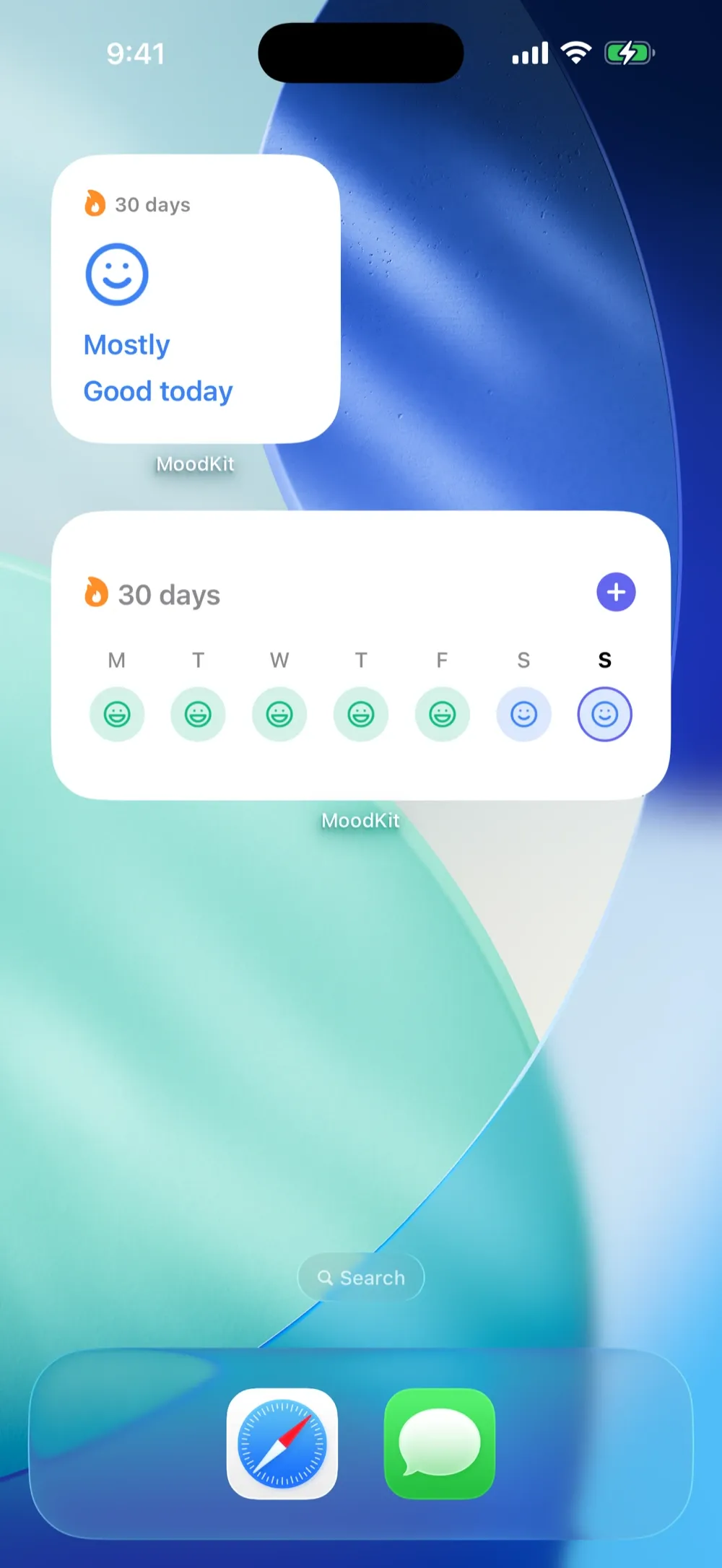
- Today (small): today’s mood and your current streak, with one-tap logging right on the widget when you haven’t checked in yet.
- Week (medium): your last 7 days at a glance.
- Year (large): a full Year in Pixels. Twelve months of moods as a color grid, permanently on your Home Screen. At the time of writing, we know of no other established mood tracker that ships one; even Daylio keeps its grid inside the app.
- Lock Screen (circular, rectangular, inline): check in without unlocking into the app.
The same one-tap pipeline powers MoodKit’s reminder notifications, which carry five mood buttons on the notification itself. A check-in survives even the day you never open the app. Widgets need iOS 17+; the app runs from iOS 15.
- Fine print: iPhone/iPad only; logging is free, and the insight cards are Premium after a full-feature trial ($39.99/year or a one-time $79.99 Lifetime).
Moodistory — the other widget-serious tracker
Moodistory advertises five Home Screen widgets for fast entry creation and leans hard on privacy positioning. It’s the strongest widget lineup among the privacy-focused indies, and worth a look if MoodKit’s insight engine is more than you need.
- Watch out for: insights are lighter; it’s a diary-first app.
Daylio and How We Feel — the basics, competently
Daylio offers Home Screen widgets for streak and quick entry; tapping opens the app to finish the log. How We Feel has a check-in widget in the same spirit. Both work. Neither logs from the widget itself, and neither puts your year on the Home Screen. (Full comparison: Daylio vs MoodKit.)
Apple’s native option
On iOS 17+, State of Mind logging is available from the Lock Screen and Smart Stack via the Health app. Genuinely convenient for bare-bones tracking. The trade-off comes after logging: a timeline, not analysis. Our Apple Health mood guide covers where the built-in option ends.
The surprising no-widget list
Three otherwise-loved trackers ship no iPhone widgets at all as of our checks: Bearable (the symptom-tracking heavyweight), Pixels (the Year-in-Pixels specialist whose signature grid, ironically, can’t live on your Home Screen), and eMoods (the clinical charting app). If a Home Screen nudge is what keeps you logging, weigh that absence heavily in your choice of tracker.
Setting up a mood widget (30 seconds)
- Touch and hold an empty spot on the Home Screen until apps jiggle.
- Tap Edit → Add Widget, search for your mood app.
- Pick a size: small for a quick-log button, large if the app offers a year grid. Tap Add Widget.
- Lock Screen: touch and hold it → Customize → tap the widget area → add your app’s widget.
Put it where your thumb already goes, next to your most-opened app. Not on page three. The best widget is the one you can’t avoid. For the apps behind the widgets, see the best iPhone mood trackers.
Frequently asked questions
Can a widget log my mood without opening the app?
Yes. On iOS 17 and later, widgets are interactive, so a tap on the widget itself can save an entry. MoodKit uses this for true one-tap logging from the Home Screen and Lock Screen. Most mood apps' widgets are still just shortcuts that open the app.
Which mood tracker has a Year in Pixels widget?
MoodKit ships a full Year in Pixels as a large Home Screen widget. At the time of writing we know of no other established mood tracker with one; Daylio's Year in Pixels lives inside the app only.
Do Bearable, Pixels, or eMoods have widgets?
As of our checks, no. None of the three ships iPhone widgets. If a widget is central to your habit, that absence matters more than any feature list.
What iOS version do mood widgets need?
Widgets in general work on older iOS versions, but interactive one-tap logging requires iOS 17. MoodKit's app itself runs from iOS 15; its Home and Lock Screen widgets need iOS 17.
Keep reading
Mood Tracking with Apple Health: State of Mind, Sleep & Steps
How Apple's State of Mind logging works, what it can't tell you, and how apps like MoodKit turn Health data — sleep, exercise, steps — into ranked mood factors.
· 5 min read

Daylio vs MoodKit (2026): Which Mood Tracker Fits You?
An honest, side-by-side look at Daylio and MoodKit: logging speed, insights, widgets, Apple Health, privacy, and pricing — with a clear pick for each kind of user.
· 6 min read
Mood Tracker Apps Without a Subscription (2026 Pay-Once Guide)
Tired of renting a diary? Every mood tracker you can pay for once — or use free forever — with real US prices, checked August 2026, and honest trade-offs.
· 4 min read