Mood Tracking with Apple Health: State of Mind, Sleep & Steps
· Updated · 5 min read
Your iPhone has been able to track mood since iOS 17. The feature is called State of Mind, it lives in the Health app, and it’s genuinely well designed. It’s also where most people hit the same wall a month in: Apple is excellent at collecting your moods and oddly silent about explaining them.
This guide covers how the built-in tracking works, where it stops, and how third-party apps plug into Apple Health to finish the job. One of those apps is MoodKit, which we build, so factor that in as you read.
If you just want the recommendation: use Apple’s State of Mind for free, private, bare-bones logging. Add a dedicated app when you want the why. MoodKit reads your sleep, exercise, and steps from Health, ranks them alongside your activities as mood factors, and on iOS 18 writes your check-ins back as State of Mind entries so both systems stay in sync.
What State of Mind actually is
Apple splits mood into two log types:
- Momentary emotion: how you feel right now.
- Daily mood: how today felt overall.
Each entry has a pleasant-unpleasant slider (valence), optional emotion words (“frustrated”, “content”, “overwhelmed”), and optional context tags like work, family, health. You can log from the Health app, a Lock Screen widget, or an Apple Watch. Apple’s own how-to lives in the iPhone User Guide.
In return, Apple gives you a timeline of your states of mind, Life Factors charts (your mood shown against sleep, exercise, daylight, and mindful minutes, gathered automatically), occasional reflection prompts, and standardized mental-health questionnaires. All of it inherits Health’s privacy model: on-device storage, end-to-end encrypted sync, per-app permissions.
Where the built-in tracking stops
Log for a month and the ceiling becomes visible:
- No custom factors. Apple’s context tags are broad categories. You can’t track your specifics, like late caffeine, that one recurring meeting, or doom-scrolling before bed. Data that was never captured can never be blamed.
- No ranking, no conclusions. Life Factors draws curves side by side and leaves interpretation entirely to you. Over on r/QuantifiedSelf, users literally ask whether anyone has gotten real correlations out of State of Mind data. The honest answer is: not from the Health app itself.
- No way to test a change. Suspect that morning walks help? Health has no mechanism to check. No baselines, no experiments, no verdicts.
- A buried entry point. Logging hides several taps deep in the Health app unless you set up the Lock Screen widget.
None of this is really a flaw. Apple built the recording layer and the storage standard, then left interpretation to apps. Which brings us to the interesting part.
How third-party apps plug in
Two directions matter when you’re picking a mood app:
Apps that READ Health data use your sleep, workouts, and steps as context for your moods. This is where the analytical payoff lives. Your phone already knows you slept five hours; a good mood app should connect that to this afternoon’s slump so you don’t have to.
Apps that WRITE State of Mind save their check-ins back into Apple Health (the API arrived with iOS 18). This keeps Health as your permanent, app-independent archive. Switch trackers in three years and your mood history stays yours, in Health.
The best setup does both. Surprisingly few apps do. Among the trackers we’ve researched, Bearable reads broadly (Apple Health, Google Fit, Fitbit) but is built for symptom tracking, while several popular mood trackers barely touch HealthKit at all.
How MoodKit uses Apple Health
MoodKit treats Health data as evidence, not decoration. The integration is optional and off by default.
- Sleep, exercise, and steps become ranked factors. Turn the connection on and MoodKit evaluates factors like “slept 7+ hours”, “exercised 30+ minutes”, or “8,000+ steps” exactly the way it evaluates your tagged activities: measured against your own baseline and ranked in the Impact Leaderboard with day counts shown. Days without measurements are excluded rather than counted as zeros, so a night without your watch doesn’t poison the math. Deeper dives: sleep and mood and steps and mood.
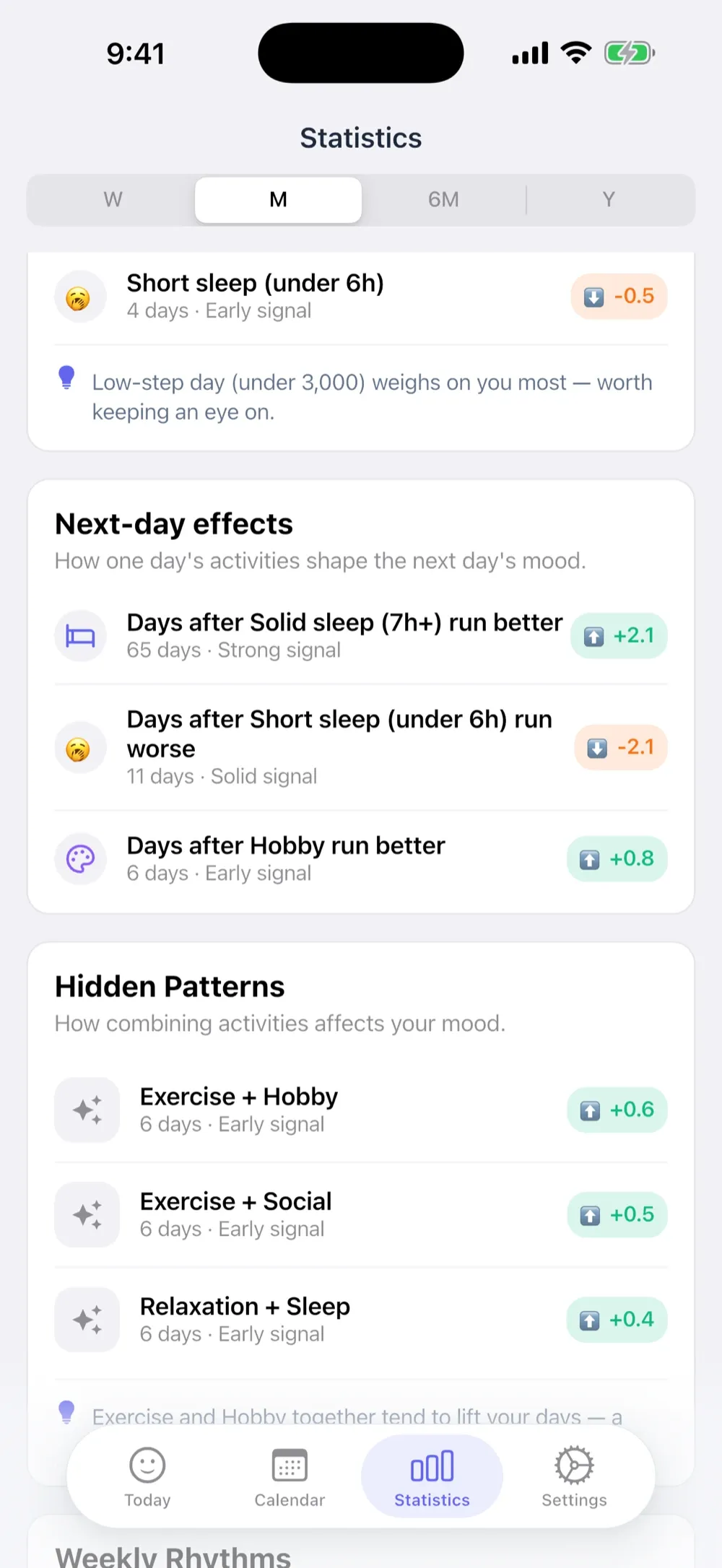
- Next-day effects. Some factors act with a lag; last night’s short sleep hits today’s afternoon. MoodKit’s next-day analysis and experiments (“does a late night hurt tomorrow’s mood?”) are built for exactly that pattern.
- State of Mind write-back (iOS 18). Every MoodKit check-in can be saved to Apple Health as a State of Mind entry, so your Health timeline stays complete while MoodKit does the analysis.
- Privacy, concretely. Health data MoodKit reads is processed on your device and goes no further. No server, no analytics, no AI. Same rule as your mood entries themselves: they never leave the device, and MoodKit’s standard analytics cover app usage and crashes only.
MoodKit runs on iOS 15+; its widgets need iOS 17 and the State of Mind write needs iOS 18. Logging is free; the insight cards are Premium: a full-feature free trial, then $39.99/year or a one-time $79.99 Lifetime (US pricing).
Version cheat sheet
| Feature | Needs |
|---|---|
| Log State of Mind in the Health app | iOS 17 |
| State of Mind from Lock Screen / Apple Watch | iOS 17 / watchOS 10 |
| Apps writing State of Mind entries | iOS 18 |
| MoodKit app | iOS 15 |
| MoodKit Home/Lock Screen widgets | iOS 17 |
Facts checked August 2026.
Which setup is right for you?
Just want a light record? The built-in State of Mind with the Lock Screen widget. Free, private, better than not logging.
Writing more than tapping? Apple’s Journal app is the other built-in option; see Apple Journal vs MoodKit.
Want your moods explained? A dedicated tracker that reads Health data as evidence. MoodKit is our attempt at doing this honestly: ranked factors with sample sizes visible, experiments that can end in “this didn’t help,” nothing computed off-device. For a direct feature-by-feature look, see Apple’s State of Mind vs MoodKit.
Tracking a health condition? A symptom-first app like Bearable fits better; mood is one signal among many there.
Whatever you pick, grant Health permissions deliberately (each data type is a separate switch) and prefer apps that say exactly where your health data goes. The good ones have nothing to hide.
Frequently asked questions
What iOS version does State of Mind need?
Logging moods in the Health app needs iOS 17 or later. Third-party apps saving State of Mind entries on your behalf use an API that arrived with iOS 18. MoodKit itself runs from iOS 15; its Health features light up on the versions above.
Does Apple Health tell me why my mood changes?
Not really. It shows your State of Mind timeline next to Life Factors like sleep and exercise, which is useful context. But it draws no conclusions, ranks nothing, and cannot test a habit change. That explanatory layer is what dedicated apps add.
Can apps read my Health data without asking?
No. HealthKit permissions are per-data-type and off until you grant them. You choose exactly what an app may read (say, sleep but not steps), and you can revoke access anytime in Settings → Privacy & Security → Health.
Does MoodKit upload my health data anywhere?
No. MoodKit's Apple Health integration is optional and off by default, and everything it reads is processed on your device. Your health data is never stored on a server, never synced anywhere by MoodKit, and never shared with any analytics tool.
Keep reading
Best iPhone Mood Tracker Widgets in 2026 (Home & Lock Screen)
Which mood trackers actually ship useful iPhone widgets in 2026 — one-tap logging, streaks, and Year in Pixels grids — and which big names still have none.
· 4 min read

Bearable vs MoodKit (2026): Symptom Depth or Mood Drivers?
Bearable tracks everything — symptoms, meds, sleep, mood. MoodKit answers one question: what drives your mood. An honest comparison to help you pick.
· 5 min read
Apple's State of Mind vs MoodKit (2026): Built-In or Dedicated?
iOS logs moods for free with State of Mind. So when is a dedicated tracker worth paying for? A sourced comparison — and why the two work best together.
· 5 min read