Best Year in Pixels Apps in 2026 (And the Only Widget Version)

· Updated · 4 min read

The Year in Pixels might be the best idea mood tracking ever produced: one square per day, colored by how the day felt, until twelve months become a single honest picture. It came out of the bullet-journal community around 2016 as a hand-drawn spread, and apps have been borrowing it ever since.
Borrowing with varying commitment, though. Here’s the 2026 field: the dedicated pixel apps, the trackers with grids built in, the one place you can get the grid on your Home Screen, and the paper original that started it all. (Disclosure: we build MoodKit, below. Facts checked August 2026; US pricing.)
The quick map
| Option | Grid lives | Price | Beyond the grid |
|---|---|---|---|
| MoodKit | In-app + Home Screen widget | Logging free · insights $39.99/yr (1-week trial) · $79.99 lifetime | Full insight engine |
| Pixels | In-app | ~$4.99 one-time | Light journaling |
| Daylio | In-app (stats view) | Free tier; $59.99 lifetime | Full diary app |
| Micro-apps (Pixa, Mood Pixel, etc.) | In-app | Free-ish | Minimal |
| Paper | Your notebook | A page and pens | Whatever you draw |
MoodKit — the grid, everywhere it should be
MoodKit treats the Year in Pixels as a first-class view twice over. Inside the app it’s part of the statistics scopes, colored by your real entries. And on iOS 17+, it ships as a large Home Screen widget: the full twelve-month grid, updating as you log, visible every time you unlock. As far as we can tell (and we checked the competition carefully in our July audit), no other established mood tracker offers that; even the pixel-named apps keep their grids behind a launch.
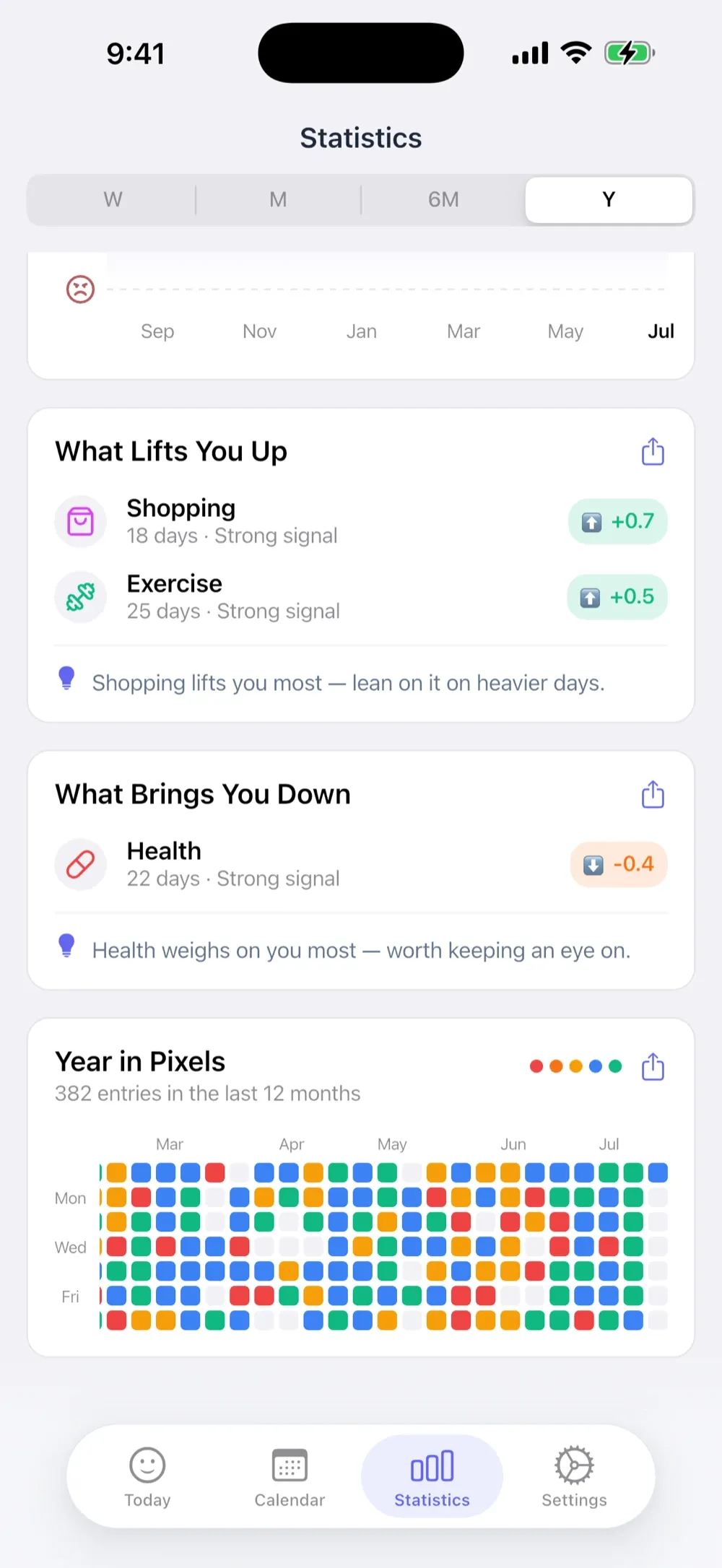
The grid is also connected to something. Tap into MoodKit’s stats and the same entries power ranked mood drivers, activity combinations, weekday rhythms, and self-experiments. The picture and the explanation, from one log.
- Best for: pixel fans who also want to know what’s painting the colors.
- Watch out for: the insight cards are Premium (logging is free), iPhone/iPad only. The widget needs iOS 17.
Pixels — the dedicated specialist
Pixels is the purest expression of the idea as an app: one tap colors today, sub-moods let a day hold more than one feeling, tags and templates add structure if you want it. The developer’s pricing is famously decent — free core, ~$4.99 one-time plus unlock — and the whole thing radiates indie care.
- Best for: the grid as the entire point, minimal everything else.
- Watch out for: stats stay descriptive, and there are no widgets at all, which stings for an app about a glanceable picture. No Apple Health either. (More pay-once options here.)
Daylio — the grid as a feature
Daylio (4.8★, ~61k ratings) includes a Year in Pixels among its stats views, fed by its excellent two-tap logging. If you want a full diary app where the grid is one payoff among several, this is that.
- Watch out for: in-app only, and analysis beyond the visuals stays shallow (the known gap).
The micro-apps
Search “year in pixels” on the App Store and a cottage industry appears: Pixa, Mood Pixel, Year in Pixels Analyser, and friends. Most are free or near-free, made by solo developers, and do the one thing fine. Expect rough edges, uncertain updates, and little beyond the grid. Fine for a low-stakes experiment; check the last-updated date before trusting one with a full year.
Paper — the original, still undefeated at one thing
A notebook page, a 12×31 grid, a color key, done. The bullet-journal original costs nothing, needs no battery, and the act of coloring a square by hand has a small ritual pleasure no app matches. What paper can’t do: remind you, timestamp anything, or tell you why October went dark. Our full Year in Pixels guide covers reading the patterns whichever medium you pick.
Picking your pixels
Want the grid and answers? MoodKit. Want the grid and nothing else, owned for pocket change? Pixels. Already a Daylio person? You have a grid; go look at it. Romantic about stationery? Paper, and enjoy every square.
The medium matters less than the streak of colored days. Whatever you choose, the picture only gets honest after a few weeks of showing up.
Frequently asked questions
What is a Year in Pixels?
A grid with one small square per day of the year, colored by that day's mood. Twelve months become a single picture, so streaks, slumps, and seasonal patterns jump out at a glance. It started as a bullet-journal spread and apps adopted it from there.
Which app shows a Year in Pixels on the iPhone Home Screen?
MoodKit ships a full Year in Pixels as a large Home Screen widget. At the time of writing, we know of no other established mood tracker offering one — even the apps named after pixels keep the grid inside the app.
What's the cheapest Year in Pixels app?
Pixels: the core app is free and its plus unlock is a one-time ~$4.99. Paper is cheaper still — one notebook page and some colored pens.
Does Daylio have a Year in Pixels?
Yes, inside the app as part of its stats views. There's no widget version, and the grid is one chart among many rather than the app's centerpiece.
Keep reading
Year in Pixels, Explained: How to Read a Whole Year of Moods
What a Year in Pixels is, why one glance beats a hundred charts, how to read the patterns in your grid, and the easiest ways to keep one in 2026.
· 4 min read

Best iPhone Mood Tracker Widgets in 2026 (Home & Lock Screen)
Which mood trackers actually ship useful iPhone widgets in 2026 — one-tap logging, streaks, and Year in Pixels grids — and which big names still have none.
· 4 min read

Mood Tracker Apps Without a Subscription (2026 Pay-Once Guide)
Tired of renting a diary? Every mood tracker you can pay for once — or use free forever — with real US prices, checked August 2026, and honest trade-offs.
· 4 min read